
The full Spreadsheet, shelf by shelf, read from a phone
Every shelf of finds, each with a one-line note on what to check when you browse it on a phone, plus how a product card turns into an agent order.
Browse the full Spreadsheet by category
Choose a shelf, compare the seller’s item and keep the product link. A catalogue price is not the final cost of an international order.
 Sneakers
 Outerwear
 Hoodies
 T-shirts
 Jeans
Jeans Sweatpants
 Womenswear
 Sports jerseys
 Bags
Bags Hats
Hats Belts
Belts Eyewear
 Perfume
 Jewellery
 Watches
 Electronics
Every shelf in the catalogue, with phone notes
The catalogue is grouped into the categories below. Each name links to that shelf; tapping it hands you to the shelf itself, where you can browse by category, filter and open product cards. Beside each one is a short note on what tends to trip people up when browsing that shelf on a phone.
The notes are short on purpose. They are the questions we found ourselves asking when browsing each shelf on a phone: which number to compare, which detail hides in a photo, and which items narrow your shipping choices later.
- Jackets and coats
- Long photo galleries; open the item page and swipe sideways through the seller images before you judge the colour.
- T-shirts
- The largest shelf; plain tees are easy to compare on a phone because size charts are short.
- Hoodies
- Most cards show a chest print; the plain ones are further down, so scroll past the first screen.
- Jeans
- Measurements matter more than the size label; keep a note of your own waist and inseam in your phone.
- Sweatpants
- Many listings bundle several colours into one photo; the colour you pick is set on the agent's item page.
- Womenswear (search results)
- This is a search for the word women rather than a fixed category, so results shift from day to day.
- Sneakers
- Size conversions differ between sellers; check the seller's own size chart image, zoomed in.
- Bags
- Dimensions are usually given in centimetres in a picture rather than in text.
- Hats
- Head circumference in centimetres is the number to compare.
- Belts
- Length is often listed against waist size; read the chart, not the title.
- Eyewear
- Frame width and lens height are usually printed on a photo; zoom in before ordering.
- Jewellery
- Small items photograph badly on a phone; ask for warehouse close-ups if the agent offers extra photos.
- Watches
- Battery shipping rules vary by line; the parcel step is where this matters.
- Fragrance
- Liquids limit which shipping lines you can use; check before you order.
- Jerseys
- Sizing runs differently between sellers; compare chest width in centimetres.
- Electronics
- Batteries and chargers narrow your shipping choices; read the agent's shipping restrictions first.
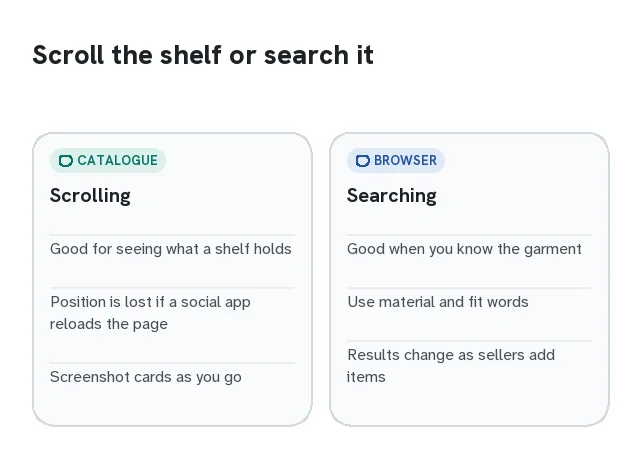
Browsing shelves with one hand
Catalogue pages load more cards as you scroll, so the position you reached is easy to lose when you switch to another app to compare. Two habits help. First, open product cards in your browser rather than inside a social app, so the back button returns you to the same place on the shelf. Second, keep a running note of the cards you liked: a screenshot of the card with the price visible is enough, because it records the title and the photo you chose.
Search is often quicker than scrolling on a phone. Short, plain words work best: material plus garment (linen shirt, wool coat) or a fit word (wide-leg, cropped). Brand words are not how this catalogue is meant to be searched, and they are not how we pick the photos on our shelves.
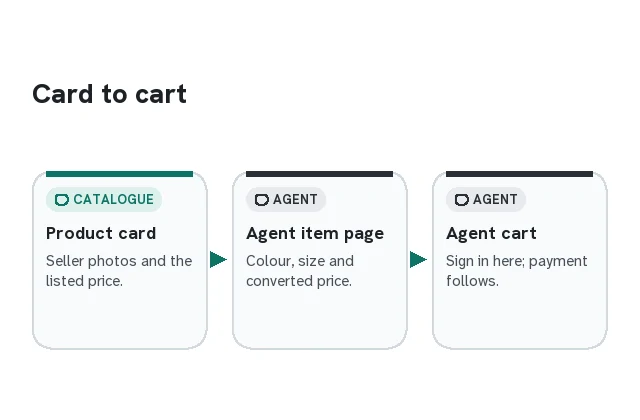
From a product card to an agent order
A product card is a pointer, not a shop. When you open one you see the seller's photos, the price the seller lists in yuan, and buttons that send the listing to an agent. The agent then shows its own item page, where you choose colour and size, see its conversion into your currency, and add the item to a cart.
On a phone, check one thing before you tap through: that the agent page shows the same item photos as the card. If a listing has been taken down or changed, the agent page is where you find out. Our phone walkthrough shows what each step looks like, and the route card tells you how each featured agent handled the paste step on our test day.
Catalogue shelves sized for a scrolling thumb
Sixteen categories to start from, each a direct link to its catalogue results. The photographs show the product type. On a phone, open the actual listing before judging details that are too small to assess in a category thumbnail.
 Work jacketsSearch results
 Puffer jacketsSearch results
 Long puffer coatsSearch results
 Denim jacketsCategory
 Zip-up jacketsSearch results
 Flared leggingsCategory
 Zip hoodiesSearch results
 Women's picksSearch results
T-shirts, jeans, sweatpants, sneakers, bags, belts, eyewear, watches, fragrance, jerseys, jewellery, hats, scarves and electronics are listed as plain text links on the full Spreadsheet page, along with notes on what each shelf is like to browse on a phone.